
When the EPC light appeared on my Volkswagen Sportwagen, I had no idea that a $199 diagnostic tool would eventually save me thousands of dollars in unnecessary repairs. During my investigation of the P00AF turbocharger fault code, I quickly realized that I needed more than a generic OBD-II scanner. I needed access to live sensor data, advanced diagnostics, and adaptation functions that could communicate directly with Volkswagen control modules.
That’s when I discovered VCDS.
In this post, I’ll share one of the most important tools I used while troubleshooting and repairing the EPC light issue on my Volkswagen Sportwagen, which involved the IS12 turbocharger system.
The EPC light illuminated on my dashboard because of error code P00AF – “Turbocharger/Supercharger Boost Control A Module Performance.” (Refer to my previous two posts, Car Lost Power While Driving on Highway? From Boost to Limp Mode – Causes & Fixes and How I Saved $4,500 by DIY-ing My VW Sportwagen IS12 Turbocharger for more background.)
That essential tool is the VCDS OBD scanner.
If you own—or work on—a vehicle from the Volkswagen Auto Group (including VW, Audi, SEAT, Škoda, Bentley, and even Lamborghini), you’ve likely encountered the term VCDS in forums, repair guides, or garage discussions.
What Exactly Is VCDS?
At its core, VCDS (VAG-COM Diagnostic System) is a third-party diagnostic tool developed by Ross-Tech. The system combines Windows-based diagnostic software with a specialized vehicle interface.
In simple terms, VCDS lets you communicate directly with your car’s electronic control modules. In many cases, it provides access similar to—or even better than—dealer-level diagnostic equipment. Think of it as a powerful dealer scanner that you can own and use at home.
You can download the VCDS software for free from the Ross-Tech website. You then purchase the vehicle interface separately from Ross-Tech. Together, the software and interface create a diagnostic system with capabilities comparable to the equipment used by VW dealerships.
Ross-Tech offers two interface versions:
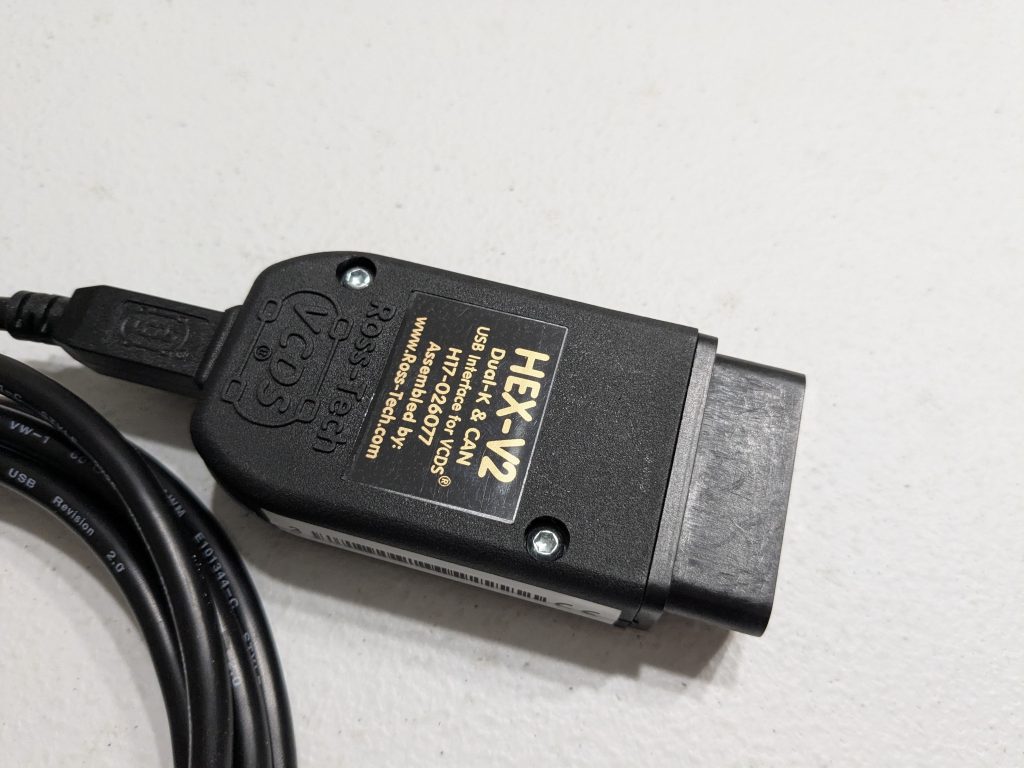
- HEX-V2 – connects directly to your laptop through a USB cable.
- HEX-NET – connects wirelessly through Wi-Fi and can communicate with a laptop, tablet, or smartphone.
Picture 1 below shows screenshots of the VCDS software interface. Pictures 2, 3, and 4 show the diagnostic interface that connects your vehicle to the VCDS software.


What Can VCDS Do?
VCDS gives you deep access to nearly every electronic control module in your vehicle.
Full System Diagnostics
VCDS reads and clears fault codes from all major systems—not just the engine. It can access airbags, ABS, transmission, infotainment, central locking, and many other modules.
You can also save diagnostic logs and generate printable reports.
Live Data Monitoring
This is one of VCDS’s most powerful features.
VCDS displays real-time sensor values such as boost pressure, coolant temperature, airflow readings, fuel trims, and many other engine and system parameters. This capability makes diagnosing issues much faster and more accurately.
As an example, check out the video below, where I demonstrate how to monitor the MAP sensor.
The video shows live MAP (Manifold Absolute Pressure) sensor data with the engine off and while idling. The MAP sensor measures the pressure of the intake air inside the intake manifold of a Volkswagen Sportwagen.
After fresh air enters the turbocharger compressor, the compressor increases its pressure. The compressed air then passes through the intercooler, which reduces its temperature before the air flows through the throttle body and into the intake manifold. The MAP sensor measures the pressure of this air before it enters the engine cylinders. (See Pictures 5 and 6 below.)


VCDS can also graph real-time data for any parameters you monitor.
Advanced Adaptations and Coding
VCDS also allows you to perform advanced modifications and adaptations to vehicle settings.
For example, I used VCDS to adapt the wastegate actuator by adjusting the ECU signal voltage sent to the actuator. This adjustment allowed the actuator to position the wastegate flapper correctly in its fully closed position.
This calibration plays a critical role in proper turbocharger performance.
I’ll discuss this adaptation process in greater detail in a future post.
Where Can You Buy VCDS?
The VCDS system requires a specialized diagnostic interface that connects your vehicle to the VCDS software. See Pictures 2, 3, and 4 above.
I paid approximately $199 for my interface, which supports diagnostics on up to 3 VINs. Ross-Tech only offers the 3-VIN version in the HEX-V2 format.
Ross-Tech also offers other versions:
- 10-VIN HEX-V2 – $299 USD
- 10-VIN HEX-NET – $449 USD
- Unlimited-VIN HEX-NET – $649 USD (designed for professional workshops)
Since I only work on my own vehicles, the 3-VIN version provided the most practical and cost-effective option.
After purchasing the interface, I downloaded the VCDS software for free directly from the Ross-Tech website and started using it immediately.
Why VCDS Is Worth It
When you compare dealership diagnostic costs with VCDS, the savings become obvious.
A single diagnostic session at a dealership typically costs around $198.50. After purchasing the VCDS interface, each additional diagnostic session effectively costs nothing.
The savings add up quickly:
- 5 dealership visits = approximately $992
- 10 dealership visits = approximately $1,985
By comparison, VCDS requires a one-time investment of approximately $199. After that, you can perform diagnostics whenever needed without paying additional diagnostic fees, provided you stay within your VIN limit.
Picture 7 below shows the dealership quote I received to diagnose the EPC light and check-engine light on my dashboard.

Picture 8 shows a second diagnostic quote from an independent certified repair shop for approximately $196.

How VCDS Works
In this section, I’ll give you a quick demonstration of how VCDS works.
A modern vehicle contains numerous components, and each component operates within specific parameters. The ECU continuously monitors these parameters and responds based on their values.
For example, my Volkswagen Sportwagen uses a MAP sensor (Manifold Absolute Pressure sensor), shown in the picture below. This sensor mounts on the intake manifold and measures the pressure of the intake air entering the engine.
Here’s how the system works:
When you press the accelerator pedal, the ECU injects additional fuel into the engine and adjusts the turbocharger to produce more boost. The engine burns the air-fuel mixture inside the cylinders, creating exhaust gases that spin the turbocharger turbine wheel. The turbine then drives the compressor wheel, which compresses more intake air from the airbox and increases boost pressure.
The MAP sensor readings tell me exactly what’s happening inside the intake system:
- Engine Off (KOEO): The MAP sensor should read atmospheric pressure.
- Engine Idling: The MAP sensor should read below atmospheric pressure because the throttle plate restricts airflow and creates vacuum in the intake manifold.
- Engine Under Boost: The MAP sensor should read significantly above atmospheric pressure, indicating that the turbocharger is compressing the intake air.
Below, I’ll walk you through the step-by-step process of using VCDS to monitor MAP pressure.
Steps to Access MAP Live Data
1. Connect the Diagnostic Interface
Connect the diagnostic interface to your laptop using USB or Wi-Fi, depending on the interface version you purchased.
2. Launch VCDS
Turn on your laptop and open the VCDS software.
Note: The first time you connect the interface, you need to perform a brief setup.
After opening VCDS:
- Click Options.
- Verify that VCDS has selected the correct communication method. In my case, it automatically selected USB.
- Leave the communication protocol settings unchanged unless Ross-Tech specifically instructs you otherwise.
To test communication:
- Click Test.
A small window should display:
- Port Status: OK
- Interface: Found!
- Type: HEX-V2
- Additional information such as software versions and available VIN slots
Refer to Picture 9 below.

Ross-Tech currently offers three licensing options:
- 3-VIN – designed for enthusiasts (the version I purchased)
- 10-VIN – ideal for users who maintain several vehicles
- Unlimited VIN – designed for professional workshops
3. Connect to the Vehicle
Plug the diagnostic interface into your vehicle’s OBD-II port, usually located under the steering wheel on the driver’s side.
4. Turn the Ignition On
Turn the key to the ON position with the engine off (KOEO).
5. Access Live MAP Data
Inside VCDS:
- Select 01 – Engine.
- Open Measuring Blocks or Advanced Measuring Values.
Type in the search field intake manifold pressure, then select the select this three items:
- Intake Manifold pressure: corrected.
- Intake Manifold pressure: specified value.
- Intake Manifold pressure: raw value.
Start monitoring live data while KOEO.
From the VCDS monitoring window click on graph
Next:
- Without closing the VCDS monitoring window start the engine and leave it idle.
- Monitor the live readings.
For more detailed analysis, use Advanced Measuring Values or the Logging function to record multiple channels simultaneously.
Typical Expected MAP Values for My 1.8T Engine
The following values are approximate and may vary depending on altitude, weather conditions, and vehicle calibration.
- Key On, Engine Off (KOEO): Approximately atmospheric pressure (950–1050 mbar)
- Idle: Typically 300–450 mbar absolute pressure because the engine operates under vacuum
- Part-Throttle Cruising: Varies depending on engine load and throttle position
- Wide Open Throttle (WOT): Typically 1.4–1.8 bar of boost pressure above atmospheric pressure (approximately 2400–2800 mbar absolute pressure on a stock IS12-equipped 1.8T)
The actual boost pressure and specified boost pressure should closely track each other. Large differences between the two values may indicate a boost leak, wastegate issue, diverter valve problem, or another turbocharger-related fault.
Refer to the video below for a demonstration of the steps described above.
Frequently Asked Questions (FAQ)
Can VCDS Replace a Dealer Scanner?
For most Volkswagen, Audi, SEAT, and Škoda owners, VCDS can perform many of the same diagnostic functions as dealer-level equipment. VCDS can read and clear fault codes, display live sensor data, perform adaptations, run output tests, and access nearly every control module in the vehicle. While dealerships may have access to additional factory tools and software updates, VCDS provides more than enough functionality for most DIY mechanics and enthusiasts.
Does VCDS Work on Audi Vehicles?
Yes. VCDS works on most vehicles from the Volkswagen Auto Group, including Volkswagen, Audi, SEAT, Škoda, Bentley, and some Lamborghini models that share VW Group electronics.
Can VCDS Clear an EPC Light?
Yes. VCDS can clear EPC-related fault codes after you repair the underlying problem. However, if the root cause still exists, the EPC light will usually return after the ECU detects the fault again.
Can a Generic OBD-II Scanner Diagnose a P00AF Fault?
A generic OBD-II scanner can usually read and clear the P00AF fault code. However, it often cannot access Volkswagen-specific measuring blocks, live boost-pressure data, actuator tests, adaptation functions, or advanced diagnostic information. VCDS provides much deeper access to the vehicle’s systems.
Can VCDS Monitor Turbocharger Boost Pressure?
Yes. VCDS can display both requested boost pressure and actual boost pressure in real time. This capability makes it an excellent tool for diagnosing turbocharger issues, boost leaks, wastegate problems, diverter valve failures, and EPC-light conditions.
Do I Need an Internet Connection to Use VCDS?
No. Once you install the VCDS software and connect the Ross-Tech interface, you can perform diagnostics without an Internet connection. However, you may need Internet access to download software updates or access Ross-Tech support resources.
Which VCDS Version Should I Buy?
If you only maintain your own Volkswagen or Audi vehicles, the 3-VIN HEX-V2 interface is often the most cost-effective option. If you work on multiple vehicles or help friends and family with diagnostics, the 10-VIN version may provide better value. Professional repair shops typically benefit from the unlimited-VIN HEX-NET interface.
Is VCDS Worth the Cost?
In my experience, absolutely. I paid approximately $199 for my VCDS interface. Considering that a single dealership diagnostic visit cost nearly the same amount, VCDS paid for itself after just one troubleshooting session. It also played a critical role in helping me diagnose and repair the P00AF turbocharger fault that triggered the EPC light on my Volkswagen Sportwagen.
Conclusion
The VCDS scanner became one of the most valuable tools I used during my EPC-light troubleshooting journey. It provided dealer-level diagnostic capabilities at a fraction of the cost and gave me access to the live data, fault codes, and adaptation functions I needed to diagnose the P00AF turbocharger fault confidently.
Most importantly, VCDS allowed me to take control of the diagnostic process instead of relying solely on dealership visits and expensive repair estimates. The information I gathered with VCDS played a major role in helping me understand the root cause of my EPC light issue and ultimately save thousands of dollars in unnecessary repairs.
In my next post, I’ll show how I used VCDS to perform the wastegate actuator adaptation and explain why this procedure is critical for proper IS12 turbocharger operation.
Leave a Reply